
 AUS
AUS
 NZ
NZ
 UK
UK
 CA
CA
 USA
USA
 IND
IND








Most people treat email as something ordinary. You register, open the inbox, send a few messages, and forget about the setup. For business, it is not that simple. This mailbox may handle invoices, client questions, logins, contracts, refunds, and access recovery. So when a company decides to buy best Email account, the choice should be made with the same care as choosing a payment tool or hosting provider. Some users also look at ready-made options when they want to buy email account, but before using any account for work, it is worth checking who controls it, how secure it is, and whether it can be trusted long term.
A weak inbox can create more problems than it solves. A good one quietly keeps the business running.
Why a Business Email Account Still Matters
Email has not disappeared from business. In fact, it is often where serious communication happens. Customers may chat with a brand on social media, but they still expect confirmations, invoices, documents, and official replies by email.
A free personal address can work for a private message. It looks less convincing when it appears on an invoice or in a commercial offer. A company email with its own domain feels cleaner and more stable. It tells the reader that there is a real business behind the message, not just a random inbox.
A business email account also helps when a team starts growing. One person may handle everything in the beginning, but later the company needs separate addresses for sales, support, billing, and management. Without that structure, messages get lost, employees mix personal and work mail, and access becomes difficult to control.
The biggest point is ownership. If an employee leaves, the company should not lose client history or important files. If a password is forgotten, recovery should belong to the business, not to someone’s private phone or personal inbox.
What It Really Means to Buy an Email AccountWhat It Really Means to Buy an Email Account
Buying an email account can mean two very different things.
The safe meaning is simple: you pay for a proper email service, connect your domain, create mailboxes, and manage them from an admin panel. This is how most companies use Google Workspace, Microsoft 365, Zoho Mail, Proton Mail, and similar providers.
The risky meaning is buying unknown accounts in bulk without understanding their history. These accounts may be cheap and fast to get, but they can come with hidden problems. They may have been used before, flagged by platforms, blocked after login, or connected to recovery details you do not own.
For business, that is a bad trade. An inbox should not feel like borrowed property. You need control over the domain, password recovery, security settings, user access, and account history.
So, when you buy Email account for business, the real goal is not just to get a working login. The goal is to get a communication channel that will not collapse the moment you need it most.
Personal Email vs Business Email: What Changes
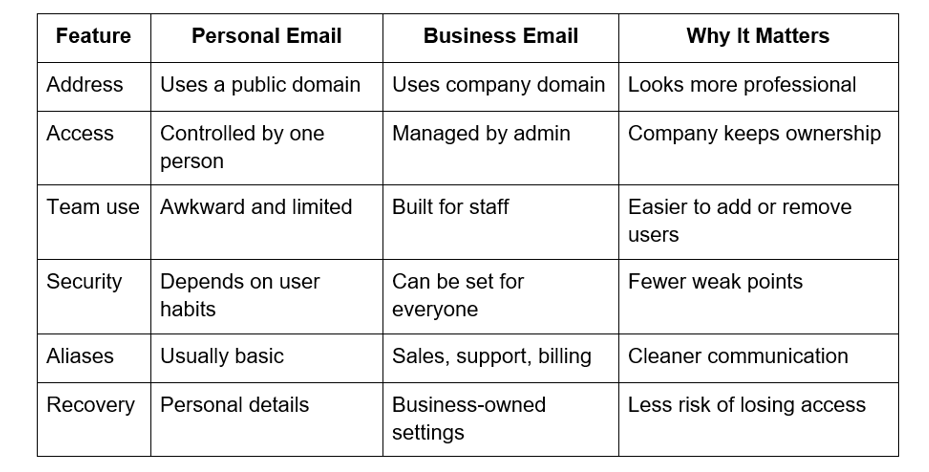
A personal email account belongs to one person. A business email account belongs to a company. That difference may sound small, but it changes almost everything.
A personal mailbox may be enough at the very start. But it becomes uncomfortable once the company has clients, payments, partners, or several employees.
For example, support messages should not depend on one person checking their private inbox. Billing should not be hidden in someone’s personal account. Client history should not disappear because a staff member changed jobs.
Business email gives the company a simple structure. It keeps work communication in one place and makes the brand look more serious from the first message.
How to Choose the Best Email Account Provider
Do not choose only by price. A cheap inbox is not useful if important messages land in spam, support is slow, or account recovery is unclear.
Before choosing a provider, check these points:
- Can you use your own domain?
- Is two-factor authentication available?
- Can an admin manage users and access?
- Are aliases and group addresses supported?
- Is there enough storage for daily work?
- Can you migrate old mail without pain?
- Does the provider work well with your calendar, documents, CRM, or cloud tools?
- Is support available when something breaks?
Different teams need different providers. Google Workspace works well for companies that already use Drive, Docs, Calendar, and Meet. Microsoft 365 fits teams built around Outlook, Word, Excel, Teams, and OneDrive. Zoho Mail is often chosen by small businesses that want practical tools at a modest price. Proton Mail may suit projects where privacy is a major concern.
There is no single perfect option. The best choice is the one that matches your work habits and protects your communication.
The phrase best Email account verification is also important here. Verification proves that the account, domain, and recovery details belong to the right owner. It helps protect the sender’s identity and makes the mailbox more reliable for real business use.
Security and Verification: Nobody Cares Until the Inbox Locks Them Out
Email is easy to underestimate because it almost never looks important at the start. It is just an address. A login. A place where messages arrive.
Then a few months pass, and that same address is tied to Stripe, ads, client contracts, tax documents, supplier invoices, website access, password resets, and some old conversation nobody thought would ever matter again. Suddenly the mailbox is not “just email.” It is the back door to half the business.
This is why the first test should be brutally simple: can the company prove that this inbox belongs to it?
Not “Can someone log in?”
Not “Did the seller send the password?”
Not “Does the mailbox receive messages?”
Can the business prove ownership?
That question becomes very real when the recovery code goes to a phone number from last year. Or when the backup email is someone’s personal address. Or when the person who created the account is no longer around and nobody wants to call them.
A business mailbox should not depend on memory, favors, or luck. The domain should belong to the company. Recovery details should belong to the company. Admin access should be clear. Security alerts should go to people who still work there.
That is what best Email account verification means in a practical sense. It is not a pretty phrase for a setup guide. It is the difference between owning a mailbox and merely holding the current password.
The same goes for phishing. Nobody clicks on “obvious scams” anymore; the dangerous ones are the emails that look boring. A supplier invoice. A shared file. A courier notice. A fake login warning that arrives when everyone is tired. John Gilligan, Chief Executive Officer of the Center for Internet Security, said in a CISA announcement: “Phishing continues to be the most successful method for gaining unauthorized access to state and local government networks.” That sentence is about government networks, but the lesson fits small businesses perfectly. Email is where people trust too quickly.
The Five-Minute Check Before Money Changes Hands
Before an account becomes part of the business, pause. Not for a week. Five minutes is enough to catch the worst problems.
Ask this:
- Where does the recovery code go?
- Who owns that recovery email?
- Is the recovery phone controlled by the company?
- Can the domain be verified without outside help?
- Can two-factor authentication be enabled right away?
- Can every employee have a separate login?
- Can a user be removed quickly if needed?
- Can the company create separate addresses for billing, support, sales, and contact?
- Are SPF, DKIM, and DMARC supported?
- Do test emails reach normal inboxes, not just your own?
These questions are boring. Good. Boring questions prevent dramatic problems.
A small company does not need a complicated mail system. One address for general contact, one for billing, one for support. That alone can save hours later. The point is not to pretend the company is huge. The point is to stop everything from falling into one messy bucket.
If you buy Email account for business, think about the bad Tuesday. Someone leaves. A phone is lost. A password is forgotten. A platform asks for confirmation. A client waits for a file. A good mailbox setup should handle that kind of ordinary chaos without turning it into a crisis.
Where People Usually Mess It Up
Most email mistakes do not look like mistakes when they happen.
They look like shortcuts.
Use one inbox for now.
Share the password for now.
Skip domain records for now.
Leave recovery settings as they are for now.
Sort it out later.
“Later” is where business systems go to rot.
The inbox slowly fills with everything: invoices, newsletters, complaints, login codes, receipts, sales leads, supplier notes, random platform alerts. Technically, nothing is lost. Practically, everyone wastes time searching.
Shared passwords are worse because they create fog. If a message disappears, nobody knows who moved it. If forwarding changes, nobody knows who changed it. If someone leaves, nobody knows where the password is still saved.
Domain records are another quiet trap. Clients see a clean branded address and assume everything is fine. Mail systems are less polite. Without SPF, DKIM, and DMARC, the address may look unfinished behind the scenes. A normal invoice can land in spam simply because the domain has not proved itself properly.
Verification feels annoying only when nothing is wrong. When something breaks, it becomes the only thing that matters.
Conclusion
A business email account is small only on the day it is created.
After that, it starts collecting evidence of the company’s life: approvals, mistakes, payments, complaints, files, access links, client history, half-finished negotiations, forgotten attachments.
So the right mailbox is not the fastest one to open. It is the one the company can keep.
If you plan to buy best Email account, do not judge the account by the first login. Judge it by recovery, ownership, domain trust, user control, and what happens when someone leaves the team.
The ideal inbox is not impressive. It is dull in the best possible way. It opens. It sends. It verifies. It recovers. It belongs to the company.
FAQs
What is the safest way to buy a business email account?
Start with ownership, not price. The account should be tied to your company domain, your recovery email, your phone number, and your admin panel. If you need to message a seller or an ex-employee to recover access, that mailbox is already a bad fit for business.
Can I use a regular personal inbox for company work?
You can, and many small projects do at the beginning. The problem starts when clients, invoices, support requests, and password resets all depend on that one private inbox. At that point, it stops being convenient and starts becoming a weak spot.
Why do SPF, DKIM, and DMARC matter?
They are not there to make life harder. They help mail services understand that messages from your domain are really allowed to come from you. Without these records, even a normal invoice or proposal can look suspicious and disappear into spam.
Is one shared mailbox enough for a small team?
For a week or two, maybe. Then it turns into a pile: billing emails, support questions, login codes, newsletters, client replies, all mixed together. Separate addresses for contact, billing, and support make life easier even if there are only two people in the company.
What should I check before I buy Email account for business?
Check who controls recovery first. Then look at domain support, two-factor authentication, admin access, aliases, storage, and migration options. A mailbox that opens today but cannot be verified or recovered tomorrow is not a reliable business account.
The content has been authored in collaboration with our guest contributor, Helen Carter.
