
 AUS
AUS
 NZ
NZ
 UK
UK
 CA
CA
 USA
USA
 IND
IND







Summary
- An ever-changing form of malware, ransomware encrypts files on a device. Once the malware attacks the system, the users ask the owner of the system and files to pay ransom to decrypt the files.
- Malware enters through the download or installation of infected software, suspicious links etc.
- To safeguard the system from these attacks, one should keep one’s device up to date and be aware of the crucial steps to prevent these attacks.
Ransomware is an evolving form of malware that encrypts files on the device, making the files and the systems relying on them useless. Once this process is complete, the malicious users ask the owner of the system and files to pay a ransom to decrypt the files.
Source: Copyright © 2021 Kalkine Media
How does malware enter a user's system?
Generally, malware enters the user's system when the user downloads or install infected software. The other ways through which malware can enter a system is via email or through links. Once the malware enters the system, it links itself to various files and overwrites the data.
INTERESTING READ: Did Kiwi Cloud Storage Firm Fall Victim To Malware Attackers?
How does malware impact the system?
The malware in the system directly impacts the performance of the system. The problem with malware is that it self-replicates. As a result, it consumes massive memory space and makes the system slow. Other than this, ransomware consumer the internet data of the user.
Other than this, malware interferes with the users’ day to day activities. Malware is designed in a way that it creates unwanted pop-ups and advertisements. It does not go quickly unless the malware is removed from the system.
DO WATCH: News Beyond Markets | Why are ransomware attacks a pressing national security issue?
What are the different types of ransomware?
In the past couple of years, we all might have heard about significant growth in malware attacks. Hence, it is also essential to know various types of ransomware.
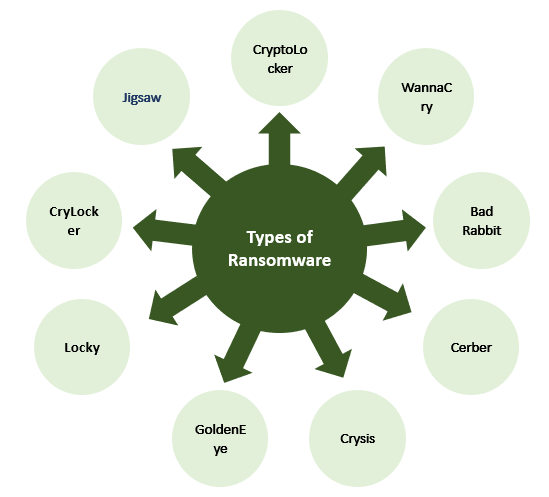
Image Source: Copyright © 2021 Kalkine Media
CryptoLocker
CryptoLocker is one of the oldest forms of cyberattacks, coming into existence in 2013. At that time, the hackers used the original CryptoLocker botnet methodology in ransomware.
WannaCry
WannaCry is the most extensively known ransomware worldwide. This ransomware has infected several businesses across more than 150 nations.
Bad Rabbit
Bad Rabbit is another form of ransomware that spread via a fake Adobe Flash update on hacked website.
Cerber
Cerber targets users using Cloud 365. It is a deadly ransomware and is compatible with 12 different languages.
Crysis
Crysis encrypts files saved on fixed drives, removable drives, and network drives. It spreads through any malicious attachment that has a double extension file.
GoldenEye
GoldenEye ransomware circulates via a vast social engineering campaign aiming for HR departments. If any user downloads a GoldenEye-infected file, a macro is launched, which encrypts the files in the user's computer.
Locky
Locky ransomware locks the user's system and prevents them from using it unless a ransom is paid. It spreads via email message masked as an invoice.
Once the user opens the attachment, the invoice gets deleted, and the victim is guided to enable macros to read the document. As soon as the user enables the macros, the role of Locky starts. It starts encrypting multiple file types using AES encryption.
CryLocker
CryLocker personalises the ransom note with the help of data available on the system, like users’ personal details such as name, date of birth, IP address etc. and pressurises the user. Once the process gets completed, the user is locked from the system and is asked to pay within 24 hours.
Jigsaw
Jigsaw is a serious malware that encrypts the file and then starts deleting them steadily till the amount is paid. It deletes one or more than one file every hour till 72 hours. Once this time gets over, all the encrypted files get deleted.
DO READ:
- Ransomware on the rise in NZ, Companies feel desperate and pay.
- Kmart reportedly hit by a ransomware attack
How can one detect ransomware?
Below are some of the methods through which we can detect ransomware.
- A system with an antivirus scanner raises the alarm in case any ransomware is detected.
- We can detect ransomware with the extension of the file. For example, we know that there exists a file with extension pdf. However, if the extension is changed and is unfamiliar, there is a high possibility of ransomware.
- If we see many files with a changed name, it implies a ransomware attack.
- If the software within the system starts communicating with other servers automatically, then there is a strong possibility of a ransomware attack.
Source: Copyright © 2021 Kalkine Media
How to protect from ransomware?
We are aware of how dangerous malware are. Hence, we could follow some of the below steps and safeguard our system.
- Avoid clicking any unsafe link.
- Keep personal information safe. If a person receives any call, a text message from an untrusted source, one should not respond.
- Avoid opening any suspicious email attachments.
- One should not use any USB device or and other data storage media if we are not aware of the source. There is a high chance the cybercriminals might have infected the device.
- In case we download data, one should ensure that these websites are known sources. This way, we can minimise the risk to a considerable level.
- Keep your system and software updated.
ALSO READ: Ransomware Attacks on the rise in APAC Region, Businesses forced to pay up